Is your business visible enough on Google? 15 Google Business Profile tips
Author: Mariliis Uibomäe · Published: · Last updated:
In brief
Google Business Profile helps your business reach local customers directly in Google Search and Maps. Keep your business information, services, photos and reviews up to date, and connect your profile to GA4 to assess interactions and their relationship with enquiries.
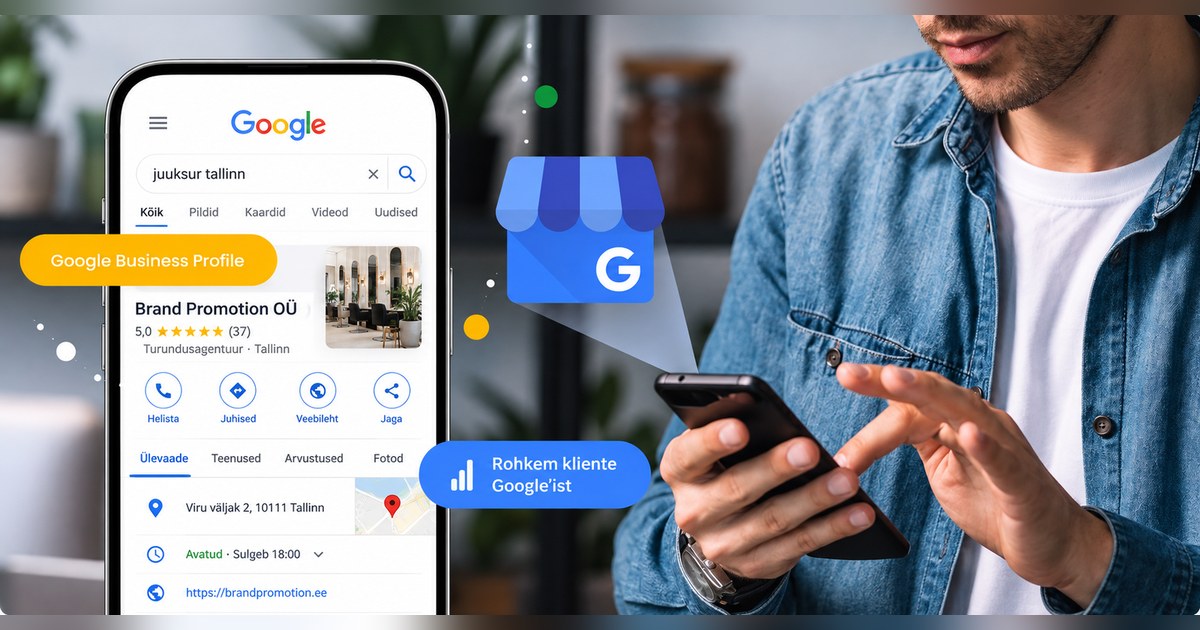
Google Business Profile is one of those free marketing channels that many businesses already have, yet use only a small part of its potential.
The business name is correct. The address and phone number are there. A few customers have left reviews. And that is often where it ends.
Yet your Google Business Profile may be the first place a potential customer encounters your business. Especially when someone searches for “dentist Tallinn”, “tyre replacement Mustamäe”, “accountant Tartu” or simply “café near me”.
With this kind of search, people may never reach your website. They can already see your rating, reviews, photos, location, opening hours and contact details on Google, and immediately call, visit your website or open directions in Google Maps.
Google Business Profile is now becoming even more interesting for two reasons: AI search and the ability, introduced in 2026, to connect Google Business Profile directly to Google Analytics 4.
What is Google Business Profile?
Google Business Profile is a free business profile that lets you manage how your business information appears in Google Search and Google Maps.
The service was previously called Google My Business, which is why you will still come across that name frequently.
Your profile can display your business address or service area, phone number, website, opening hours, services, photos and other business information. Customers can leave reviews, and your business can reply to them.
The important point is that people do not need to know your business name.
If someone searches for “tyre replacement Tallinn”, Google may show your business based on how well it matches that search.
That is why it is worth treating Google Business Profile as a small landing page rather than just a contact card.
Why is Google Business Profile important for your business?
Google Business Profile helps your business be visible at the moment someone is already looking for a specific product, service or business.
For example, a potential customer can use Google to:
- read your reviews;
- look at photos;
- check opening hours;
- call you;
- visit your website;
- request directions;
- for some businesses, make a booking or view a menu.
In other words, part of the customer journey happens before someone even reaches your website.
How does Google Business Profile help with local SEO?
According to Google’s guidance, local results are mainly ranked using three factors: relevance, distance and prominence.
Put simply, Google considers:
- how well the business matches the specific search;
- how far the business is from the person searching;
- how well known and trustworthy the business appears.
You cannot do much about the distance from a customer. But you can explain much more clearly to Google what your business does.
Google recommends keeping your business information complete and accurate, adding correct opening hours, choosing an appropriate business category, replying to reviews and adding photos and videos.
Google also says that the number of reviews and your rating can affect your local ranking.
This gives you your first practical task.
Search Google for three to five keywords your customers might use to find you. If possible, use an incognito window.
Look at the businesses appearing in Google Maps results and compare their profiles with yours.
How many reviews do they have?
How recent are they?
What photos do they use?
Which services do they list?
How thoroughly have they completed their profiles?
In just ten minutes, you can get a useful picture of who you are actually competing with in Google Maps.
How can you optimise Google Business Profile?
There is no single secret SEO trick here.
Instead, check whether your profile helps Google understand exactly what you do and which customers your business might suit.
1. Choose the most specific primary category
Start by reviewing your primary business category, then your additional categories.
If your business provides a specific service, choose the most precise category available rather than a broad one.
Do not add categories simply because you want to appear on Google for those keywords. They should describe services your business genuinely provides.
2. List your services separately
If you offer ten different services, do not assume Google will understand all of them from one general category.
A car workshop, for example, can list tyre replacement, diagnostics, oil changes and other services separately.
Think about this as you would when researching keywords:
“What does someone type into Google when they need this service?”
3. Write a description that actually says something
“We offer quality service and a personal approach.”
That sentence could describe almost any business.
A much more useful example would be:
“We provide accounting, payroll and financial reporting for small and medium sized businesses in Tallinn.”
In one sentence, both people and Google can understand much more clearly what the business does.
Also make sure the information in your Google Business Profile is consistent with your website.
4. Check opening hours and contact details regularly
This sounds basic, but these details can quickly become outdated.
Review your:
- phone number;
- address;
- website;
- regular opening hours;
- holiday and exceptional opening hours.
If a customer follows Google Maps directions to your business and discovers you are actually closed, it hardly matters how well your profile was optimised for SEO.
5. Use photos to sell, not just to fill your profile
Think about what a customer would want to see before choosing you.
For a restaurant, that might be the food and the dining space.
For a beauty salon, examples of your work and the salon itself.
For a construction business, completed projects and before and after photos.
For a hotel, the rooms, breakfast and surroundings.
For a B2B business, the team, office, completed projects or events.
If you have a physical location, add photos of the building and entrance too. These can be far more useful to a customer than another attractive stock photo.
A good question to ask yourself is:
“Could someone understand what we offer and what to expect from us just by looking at our Google photos?”
6. Use Google Business Profile as a content channel
Google Business Profile lets you publish updates, offers and events.
You do not need to start producing entirely new content for this.
If you have published a LinkedIn post about a new service, see whether you can turn it into a shorter Google post.
If you have a seasonal offer, add it to Google too.
Opening a new branch or adding a new service is another reason to update your profile.
This gives content you have already created an additional distribution channel.
7. Add social media and relevant action links
If your Google Business Profile allows you to add social media accounts, booking links or other action links, use them.
Do not make the customer journey longer than necessary.
If someone wants to book an appointment, take them directly to the booking page where possible, rather than to a homepage where they must find the right place themselves.
How can you get more Google reviews?
Do not rely on a satisfied customer eventually going to Google, finding your business and writing a review without being asked.
Make it easy for them.
Google lets you create a direct link and a QR code for leaving a review.
You can include these in:
- an email after a purchase;
- a message when a project is completed;
- an email accompanying an invoice;
- a follow up message after customer service;
- a QR code displayed at your physical location.
If you use a CRM or marketing automation, requesting a review can become an automatic part of the customer journey.
Do not offer a discount, gift or other benefit in exchange for a positive review.
Try asking for slightly more detailed feedback too.
Instead of “Please leave us a review on Google”, you could write:
“If you were happy with our service, we would really appreciate your feedback on Google. You can also mention which service you used and what you were most pleased with.”
This makes it more likely that, instead of just “Very good!”, you receive a review that helps the next customer too.
Should you reply to Google reviews?
Yes. Especially when a customer has taken the time to write detailed feedback.
But do not reply to every review with the same “Thank you for your feedback!”
If a customer says they ordered kitchen furniture from you and were happy with the installation, respond to those specific points.
For example:
“Thank you, Mari! We are delighted to hear you are happy with both your new kitchen furniture and the installation. We will pass your kind words on to the installation team too.”
Mari is not the only person who will read that reply. Future customers researching your business on Google will see it as well.
Can Google Business Profile help your visibility in AI search?
Google Business Profile may help Google understand your business better as searches become increasingly conversational and powered by AI.
Think about how search behaviour is changing.
A traditional search might be:
“hairdresser Tallinn”
But a more natural query could be:
“Find me a hairdresser in Tallinn who does balayage, is open on Saturdays and has good reviews.”
For the second query, the search engine needs to know much more:
- where the business is located;
- which services it offers;
- when it is open;
- what customers think of it.
Google Business Profile provides precisely this kind of structured local information.
This does not mean that Google Business Profile guarantees you a place in an AI answer. Nor should you assume that Google Business Profile alone improves your visibility in ChatGPT or every other AI service.
However, accurate, detailed and consistent business information across different sources is a good foundation for both traditional local SEO and new search experiences powered by AI.
Make sure that:
- your business activity and categories are correct;
- your services are described accurately;
- your address, phone number and opening hours are current;
- your website and Google Business Profile do not contradict each other;
- your profile has recent photos;
- your profile has recent, useful reviews;
- your website provides enough clear information about each important service.
How do you connect Google Business Profile to Google Analytics 4?
This is one of the most interesting Google Business Profile updates of 2026.
According to Google’s official updates, Google Business Profile can be connected directly to Google Analytics 4 from 8 June 2026. You can find the linking requirements in Google’s guide.
To connect your profile, go to the following sections in GA4:
Admin → Property settings → Product links → Google Business Profile links → Link
Then select the Google Business Profile or profiles you want to connect to that GA4 property.
You need the required access in Google Analytics and permission to manage the Business Profile as well.
You can connect multiple Google Business Profiles to one GA4 property, which is useful for businesses with several locations.
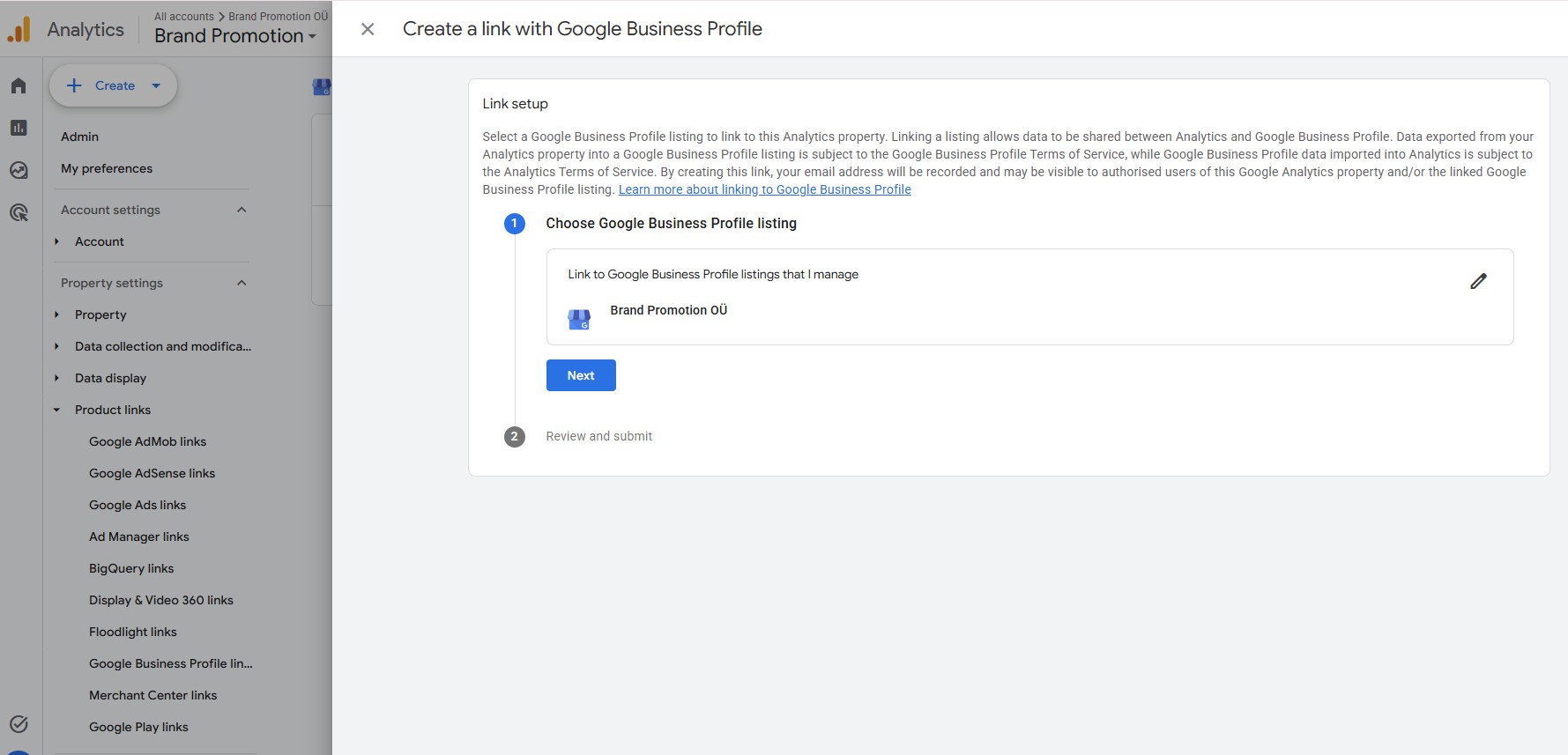
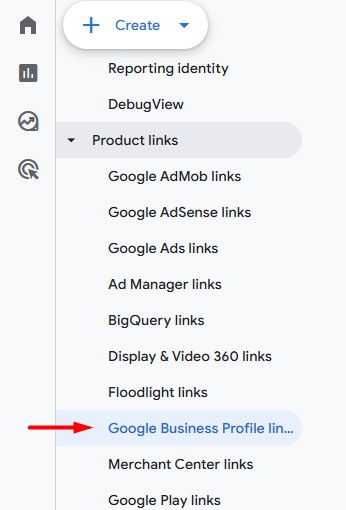
After linking, a separate Business Profile report appears in the GA4 Reports menu.
There you can see metrics such as:
- Business Profile interactions;
- calls;
- website clicks;
- directions;
- messages;
- bookings;
- menu clicks.
This makes assessing the impact of Google Business Profile much more convenient, because you no longer need to view all the information in separate systems.
Keep in mind that Business Profile data has its own reporting limitations in GA4, and the feature may change as Google develops it.
Should you still add UTM parameters to Google Business Profile links?
Yes. I would use the GA4 integration and UTM parameters together.
For example:
?utm_source=google&utm_medium=organic&utm_campaign=google_business_profile
The new integration helps you see interactions that happen on your Business Profile.
UTM parameters let you use website analytics to investigate what someone does after arriving on your website from Business Profile.
Did they submit a contact form?
View your prices?
Make a purchase?
Book a consultation?
This gets much closer to the question you actually want to answer as a marketer:
“Did Google Business Profile bring me business?”
Should a business with several locations have multiple Google Business Profiles?
If a business genuinely has several eligible locations where it serves customers, each location may have its own Google Business Profile.
In that case, consider your website structure too.
For example:
example.com/tallinn example.com/tartu example.com/parnu
Each location page could include that branch’s:
- address;
- contact details;
- opening hours;
- services;
- photos;
- other local information.
Do not automatically send visitors from every location to the same general homepage if you can offer them a much more relevant landing page.
How can you review competitors’ Google Business Profiles?
You do not need a complicated SEO tool to analyse competitors.
Open Google and search for three to five phrases you would like your own business to be found for.
Look at the first Maps results and check:
- which categories your competitors use;
- how many reviews they have;
- how recent their reviews are;
- which services they list;
- how many photos they use and what those photos show;
- how thoroughly they have completed their profiles.
The aim is not to copy a competitor.
The aim is to understand the standard you are competing against in that particular Google Maps search.
If the top businesses have hundreds of recent reviews, plenty of good photos and detailed profiles, while yours has six reviews from 2022, you at least know where to start.
Which Google Business Profile results should you measure?
Do not measure profile views alone.
Look at whether people take action after finding your business.
For example:
Viewing your Google Business Profile → website click → call → request for directions → booking → enquiry or purchase on your website
The new GA4 integration makes part of this analysis easier by bringing Business Profile interactions into Google Analytics.
UTM parameters and correctly configured GA4 key events help you explore what happens after someone reaches your website.
What can you do today to improve your Google Business Profile?
If your Google Business Profile has simply existed for years, you do not need to start with a large project.
Take 30 minutes and check:
- Are your primary and additional categories correct?
- Have you added all your important services?
- Does your business description clearly explain what you offer and where?
- Are your phone number, website and opening hours correct?
- Does your profile have enough recent, useful photos?
- When did you receive your most recent Google review?
- Do you reply to reviews?
- Does your website link include UTM tracking?
- Is your Google Business Profile connected to GA4?
- How does your profile compare with the top competitors in Google Maps?
Google Business Profile itself is free. That does not make it a low value marketing channel.
If your business depends on local customers, it is worth checking whether you are making proper use of your free visibility on Google before adding another paid advertising channel.
Frequently asked questions
Is Google Business Profile free?
Yes. Creating and managing a Google Business Profile is free. It lets you manage the business information displayed in Google Search and Google Maps.
Are Google My Business and Google Business Profile the same thing?
Yes. Google My Business is the service’s former name. Its current official name is Google Business Profile. That is why people still use and search for both names online.
How can you rank higher in Google Maps?
Google’s local rankings are mainly based on relevance, distance and prominence. Keep your business details complete and accurate, choose the right categories, add services and photos, collect genuine customer reviews and reply to them. No single action can guarantee the first position in Google Maps.
Can Google Business Profile help your visibility in AI search?
Google Business Profile gives Google structured information about your location, opening hours, services, reviews and more. This may help Google understand your business and how it matches detailed local queries, but it does not guarantee that your business will appear in an AI answer.
Can you view Google Business Profile statistics in Google Analytics?
Yes. From 2026, Google Business Profile can be connected directly to Google Analytics 4.
You can find the link under:
Admin → Property settings → Product links → Google Business Profile links
After linking, GA4 can show interactions associated with your Google Business Profile, such as website clicks, calls, directions and other supported actions.
Ready to get started?
Need a clear marketing strategy or help with a specific channel? I'll work with you to craft a solution that actually delivers results.
Get in touch